Apple Vision Pro’s AirDraw Turns Your 3D Sketches Into Real-World Objects

Apple Vision Pro’s AirDraw Turns Your 3D Sketches Into Real-World Objects
Apple Vision Pro’s AirDraw Turns Your 3D Sketches Into Real-World Objects
AirDraw Finger Paint uses Vision Pro depth sensing and natural gestures to sketch 3D forms in your space, watch gravity pull them around, and export as USDZ for reusable assets.
There is a small group of software that changes not only what you create but also how you think about your environment. AirDraw Finger Paint belongs to this group by doing something surprisingly simple. It allows you to reach into space, pinch, and draw in full 3D. Then, it makes those shapes respond to gravity and interact with the furniture in your room.
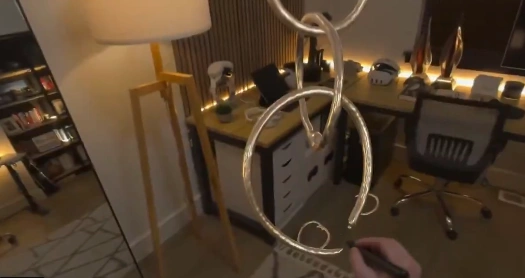
The real importance lies not just in being able to sketch a floating ring or a see-through backboard. What really matters is the mix of Vision Pro depth awareness, a tactile input model that aligns with real gestures, and the ability to export your drawings so they aren’t just temporary. Early in the session, the pattern becomes clear. Draw something static if you want a sculpture. Turn on gravity, and watch the scene transform into a physics experiment. Save it as USDZ, and that experiment turns into a reusable 3D asset. This shift from play to a lasting object is the key insight here.
What AirDraw Finger Paint do
Another Apple Vision Pro application, AirDraw Finger Paint, converts finger pinches or a Logitech Muse into 3D strokes that can exist in your room. It is a combination of brush types, material selections, and a physics switch where drawn objects may be either an immobile sculpture or a moving object that reacts to the force of gravity and room structure.
How It Works On Vision Pro
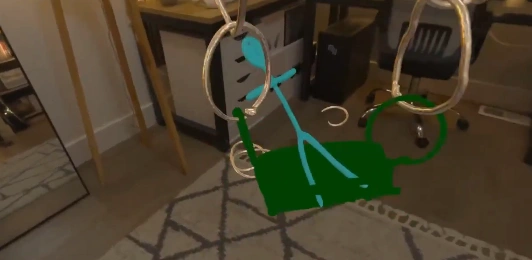
In its simplest form, the application translates the natural gestures into virtual strokes and locates the strokes in real space with the help of the Vision Pro depth system. Draw with fingers by pinching, use the left hand to open a palette, use brushes and other materials, choose whether the object will be fixed or be subject to physics collision.
Input And Controls
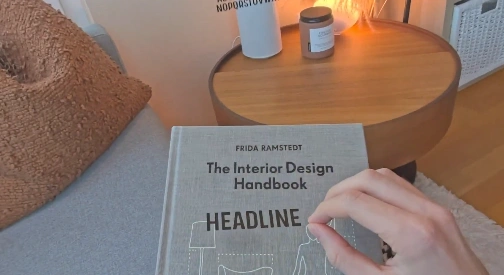
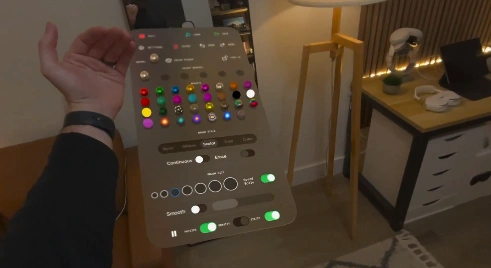
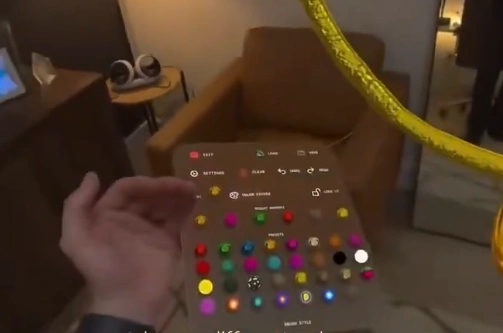
A pinch gesture of index finger and thumb is used to perform the drawing, or the Logitech Muse can be used as a spatial pencil. Floating palette. An option of a floating palette is provided when the left hand is reversed, providing selection of brushes, presets of material, size, and a pinch distance control.
Brushes And Materials
The application's preset materials are translucent, chrome, brushed metal, pulsing, and textured surfaces. These materials respond to occlusion effects and to local effects of lighting, which has the effect of making the drawn objects appear to belong to the same physical space as your furniture and lamps.
Logitech Muse Integration
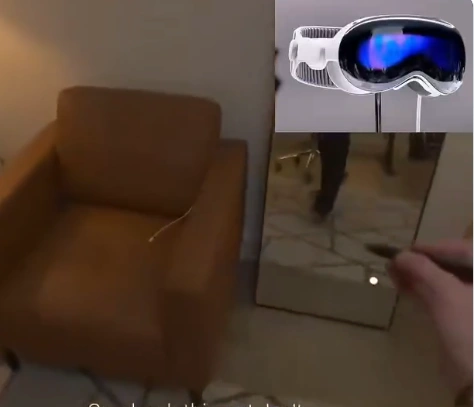
The Muse can be supported to act as a high-resolution 3D pencil with infrared tracking supported to allow the Muse to be tracked in space by Vision Pro. The accessory enhances the fidelity and reach of the line, making finer work possible far into the room than by pinching the fingertip alone.
Physics Thats The Change, Not The Trick
In AirDraw Finger Paint, physics redefines drawing as an interactive game, as opposed to an unmoving creation. In gravity mode, loops are dropped, chains are hanging, hand-drawn ramps allow the objects to roll, and it transforms a simple drawing into a room-aware mechanical interaction that responds to furniture and surfaces.
What is important about that is that behavior alters intent. A doodle is a prop, a toy, or a prototype that can be moved around, tested, and saved. It is the integration of live depth tracking and physics that helps get the experience out of the novelty level to the level of creative utility.
Export, Persistence, And Creativity
In addition to the headset, AirDraw has the option to export to USDZ to make creations not disappear during the AR session. The saved USDZ files can be found in the files application on Vision Pro and can be pinned into the environment, ready to be shared or cleaned up, ready to be 3D printed or used in production.
From Doodle To Asset
Selling to USDZ converts a room-sized experiment into a 3D model that can be carried around. The applications that can be made to that path include quick prototyping, making props to be used in mixed media scenes, or storing experiments of a whimsical nature as reusable resources.
Workflow Notes And Workflow Reflections
Operational workflow options determine the suitability of AirDraw for a project. Pin the UI to have controls where you need them as you move; export USDZ to be used downstream; and schedule to spend some time on post-processing, as gesture-based geometry is often required to be cleaned up before production or 3D printing.
With large, persistent scenes, there should be iteration. Quick compositions work well with saving and reloading, but memory and managing scenes are also factors with an increase in the number of dynamic objects. Future app iterations would alleviate that agony, which poses an unanswered question of scale that creators will likely follow keenly.
AirDraw Finger Paint vs. 3D Traditional Tools
When placing Airdraw Finger Paint in comparison with traditional 3D tools, a tradeoff between immediacy and precision can be seen. Airdraw places emphasis on fast and spatial development and frivolous physics, whereas desktop 3D packages emphasize accurate modeling, meticulous command, and reliable export pipelines.
Comparison of Gesture Tools and Mouse and Pen
Gesture input allows you to draw on the screen and think at a room size at the tradeoff of a little of the fine control that is provided by a mouse, tablet, or pen. The Muse accessory is a band-aid to that divide, although the essence lies in the generation of space ideas, which can be explored.
Export USDZ Vs Native 3D Formats
USDZ is easy to use in AR workflows and Vision Pro integration, whereas projects that are bound to undergo complex rendering or manufacturing usually need conversion and cleanup. The export of USDZ is not a terminal position in the production work.
The Greater Vision And Future
AirDraw Finger Paint shows a strong vision of the future of spatial computing: gesture input that makes sense intuitively and room-aware physics, along with exportability. The app is one of the most graphic representations of how spatial aids can be transformed into toys and design tools, although stability and scale are still operational as development issues.
Demand developers to polish more, add more scene management, and export formats. Artists will be pushed to collaborative play and mixed media production processes, and push the limits of ephemeral experimentation and workable assets.
